Business Control Automation Systems
Business control automation systems are for owners who are receiving inquiries, WhatsApp messages, calls, form submissions, staff updates, and customer requests — but cannot clearly see what happened, who owns the next action, or which opportunity is moving toward revenue.
MAVLINX installs practical CRM and automation control layers: lead capture, status logic, staff assignment, follow-up reminders, summaries, dashboard-ready data, and operating visibility.
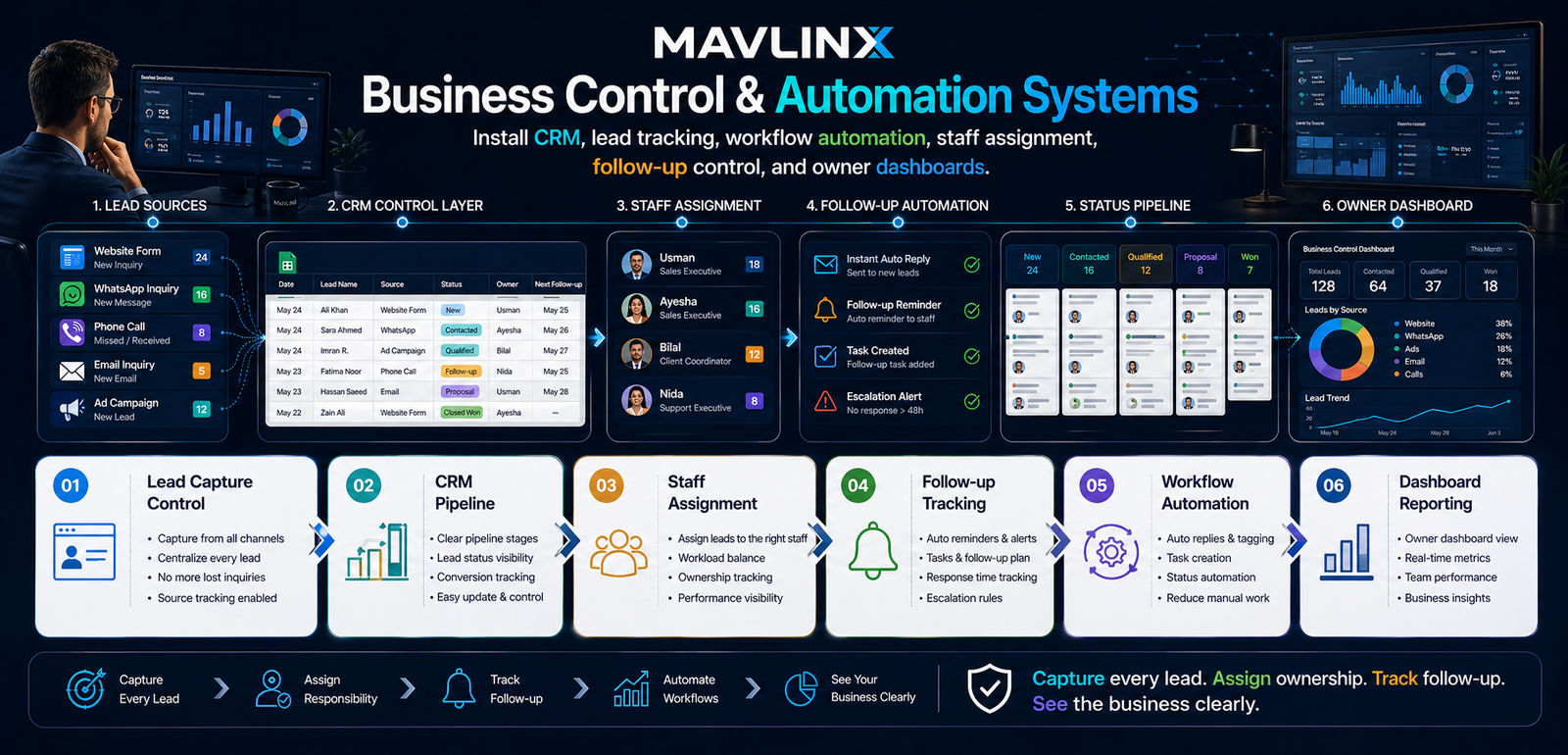
Your business is not usually losing leads because people are not interested. It is losing control because the lead route, ownership, follow-up, and reporting are not installed.
Your business is not losing leads. It is losing control.
Many SMEs already have activity: website inquiries, WhatsApp messages, referrals, calls, walk-ins, social media leads, email requests, and manual staff coordination. The problem appears later: no clean lead log, no follow-up marker, no owner visibility, no status discipline, and no reliable way to see what is stuck.
The non-obvious failure is operational, not technical.
Buying a CRM subscription does not automatically create control. Control appears when fields, stages, staff ownership, alerts, summaries, and reporting surfaces match the way the business actually operates.
MAVLINX does not position this page as a SaaS replacement. The installed system normally uses client-owned infrastructure such as Google Sheets, Apps Script, forms, email, WhatsApp links, dashboards, and controlled workflow logic.
MAVLINX installs a working control path from lead source to CRM status, staff assignment, follow-up automation, pipeline review, and owner dashboard visibility.
Lead Capture Control
Centralize lead records from form, WhatsApp, call, email, or manual intake with source and status fields.
CRM Pipeline
Define practical stages that match how the business moves inquiries toward quote, payment, delivery, or closure.
Staff Assignment
Make responsibility visible so owners can see who is handling each lead, task, or customer request.
Follow-up Tracking
Install next-action markers, reminders, response notes, and escalation signals for serious opportunities.
Workflow Automation
Use Apps Script, forms, email, WhatsApp links, and structured rules to reduce manual coordination load.
Dashboard Reporting
Prepare clean reporting surfaces for lead status, owner review, team discipline, and operational decisions.
Choose the right CRM control path by operational complexity. Prices are base international installation prices and do not include third-party costs unless a proposal says so.
Lead Capture Control System
For businesses losing form, WhatsApp, or manual leads.
- Central lead sheet
- Core fields and statuses
- Basic source tracking
- Simple owner visibility
Lead Response OS
For teams needing response discipline and follow-up markers.
- Lead log
- Auto-reply logic
- Staff alerting
- Follow-up tracking
Operations CRM Control System
For owners needing pipeline visibility and team control.
- Pipeline stages
- Staff assignment
- Summaries and status views
- Dashboard-ready logic
Department Control System
For growing teams requiring department-level control surfaces.
- Department flow
- Finance basics
- Attendance/task basics
- Reporting surfaces
The right system depends on whether your problem is capture, response, pipeline visibility, or department-level operations.
I only need to stop losing inquiries.
Choose the entry control route if leads are scattered but your team is still small.
- Forms and WhatsApp leads
- Simple lead sheet
- Status labels
I need team follow-up discipline.
Choose the response route if staff need alerts, follow-up markers, and action ownership.
- Staff assignment
- Auto-reply logic
- Follow-up tracking
I am unsure what system fits.
Use the diagnosis route if your business problem is bigger than one CRM sheet.
- Leakage diagnosis
- System recommendation
- Package direction
The installation is designed to move from operational reality to working control logic, not from generic CRM templates to confused staff adoption.
Map current lead and task flow
We identify lead sources, staff roles, current follow-up gaps, status stages, and where the owner currently loses visibility.
Define fields, statuses, ownership, and routing
The CRM logic is shaped around practical business control: source, urgency, owner, next action, stage, timestamp, and outcome.
Install forms, sheets, automation, and alerts
Depending on scope, MAVLINX connects intake, Google Sheets, Apps Script, email alerts, WhatsApp links, and summary logic.
Prepare dashboard and review surfaces
The owner needs visibility into lead movement, follow-up delay, staff load, source performance, and business bottlenecks.
Hand over operating rhythm
The system is only valuable if staff know what to update and the owner knows what to review. The goal is usable control, not decorative automation.
Is this a SaaS CRM subscription?+
Can MAVLINX connect website forms to the CRM?+
Does automation replace staff?+
Which package is best for most SMEs?+
Are third-party costs included?+
Install control before you scale activity.
More leads, ads, staff, and channels will not fix operational leakage if the control layer is missing. Start with CRM setup and make every inquiry, owner, status, and next action visible.