Operations and CRM OS
An operations CRM OS is for SME owners whose leads, tasks, follow-ups, staff ownership, workflow stages, and reporting are scattered across WhatsApp, forms, calls, spreadsheets, inboxes, and memory.
MAVLINX installs an operations and CRM control layer that helps capture inquiries, create CRM records, assign staff, route workflow stages, track follow-ups, expose bottlenecks, and give owners dashboard visibility.
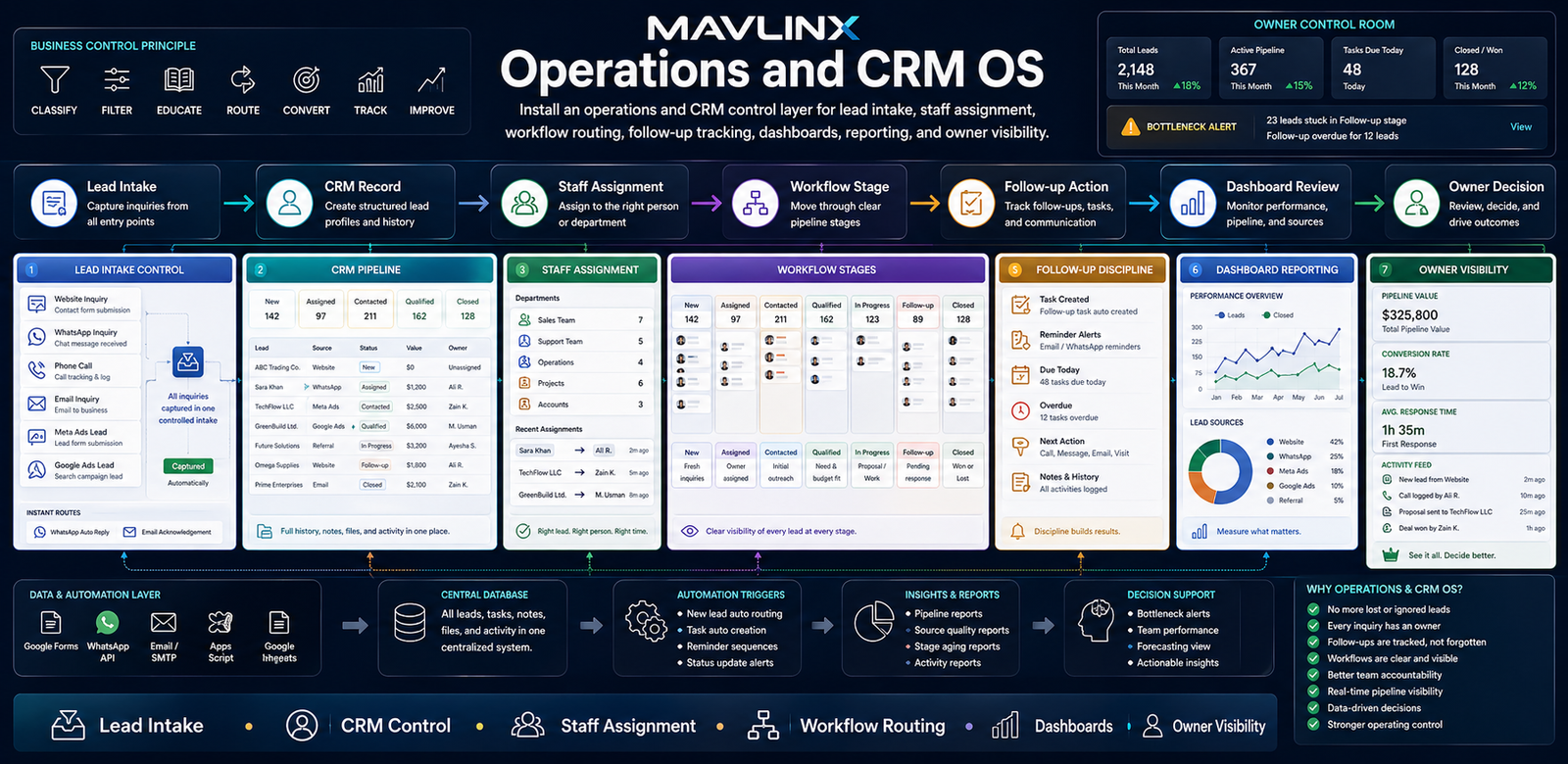
MAVLINX Operations and CRM OS — lead intake, CRM control, staff assignment, workflow routing, follow-up tracking, dashboards, reporting, and owner visibility.
A business does not lose control only because it lacks CRM software. It loses control when inquiries are not recorded properly, ownership is unclear, follow-up depends on memory, and the owner cannot see what is stuck.
CRM fails when ownership and workflow are invisible.
Many businesses already have some form of “CRM”: a spreadsheet, WhatsApp chats, staff notebooks, call logs, email threads, or a SaaS trial. The problem is that these surfaces do not always create discipline.
An operations CRM OS must show who owns the lead, what stage it is in, what next action is due, what is delayed, and what the owner should review.
The non-obvious failure is operating discipline.
CRM is not just a place to store names and phone numbers. It is an operating layer that should force clarity around source, status, owner, next action, timing, result, and review.
MAVLINX installs CRM control systems around the actual business workflow, so the owner can stop relying on scattered updates and start reviewing pipeline movement.
MAVLINX installs the CRM operating path from lead intake to owner decision. The goal is not just to store records; the goal is to control movement.
The Operations and CRM OS is assembled from practical modules. The final setup depends on how your business captures inquiries, assigns work, follows up, and reports performance.
Lead Intake Control
Capture inquiries through structured forms, website routes, WhatsApp paths, manual entries, or campaign sources with useful fields.
CRM Pipeline
Organize records by source, service type, stage, priority, owner, notes, and next action so the pipeline becomes reviewable.
Staff Assignment
Assign records to staff, teams, branches, departments, or workflow queues so responsibility is visible.
Workflow Stages
Define the movement path from new inquiry to contacted, qualified, proposal, follow-up, won, lost, or closed.
Follow-up Discipline
Track next action, last contact, due follow-up, response delay, notes, and repeat touchpoints.
Dashboard Reporting
Expose source quality, staff activity, bottlenecks, overdue work, conversion movement, and owner-level summaries.
Choose the route based on whether you already know you need CRM setup, need diagnosis first, are losing paid leads, or require a custom workflow system.
I need CRM setup now.
Use this route when leads, follow-ups, staff assignment, and status visibility are already a known problem.
- Lead tracking
- Staff assignment
- Dashboard visibility
I am unsure what system fits.
Use recommendation when you need to classify whether the issue is CRM, website, ads, funnel, or custom workflow.
- Problem diagnosis
- System-family fit
- Recommended path
Paid leads are leaking.
Use the funnel route if Meta Ads, Google Ads, landing pages, or lead forms need CRM handoff.
- Landing route
- Lead capture
- CRM handoff
My workflow is custom.
Use custom route if your CRM problem involves approvals, departments, roles, field teams, or vertical operations.
- Workflow mapping
- Approval logic
- Custom dashboard
MAVLINX installs CRM control by mapping the workflow first, then building intake, status, assignment, follow-up, and review layers.
Map lead and task sources
We identify where inquiries and work enter the business: website forms, WhatsApp, calls, ads, referrals, staff entry, or internal requests.
Define CRM fields and stages
The system defines source, owner, urgency, service type, status, next action, follow-up date, result, and reporting fields.
Build assignment and routing logic
Records are routed by staff role, branch, department, service type, priority, or workflow rule where relevant.
Install dashboard and review surfaces
Dashboards and summaries expose pipeline status, source quality, delays, bottlenecks, staff activity, and follow-up gaps.
Improve after real use
Once the system is active, stages, fields, dashboards, reminders, and reports can be refined around real operating behavior.
Is Operations and CRM OS the same as a SaaS CRM?+
Can this be built using Google Sheets and Apps Script?+
What is the difference between CRM and operations control?+
Does this guarantee more leads or sales?+
What should I prepare before requesting CRM setup?+
Can this connect with website forms or ad funnels?
Stop managing operations from memory.
Leads, staff assignment, follow-ups, workflow stages, dashboards, and owner decisions should not live in scattered messages and verbal updates. Install an Operations and CRM OS so movement becomes visible.