Revenue Flow OS
A revenue flow OS is for SME owners whose leads, proposals, payment stages, delivery status, and reporting are scattered across chats, spreadsheets, invoices, staff updates, and memory.
MAVLINX connects lead capture, CRM qualification, proposal stages, payment tracking, delivery status, dashboards, and owner visibility into one lead-to-cash control layer. The goal is not guaranteed revenue. The goal is visibility over where revenue is moving, stuck, delayed, or leaking.
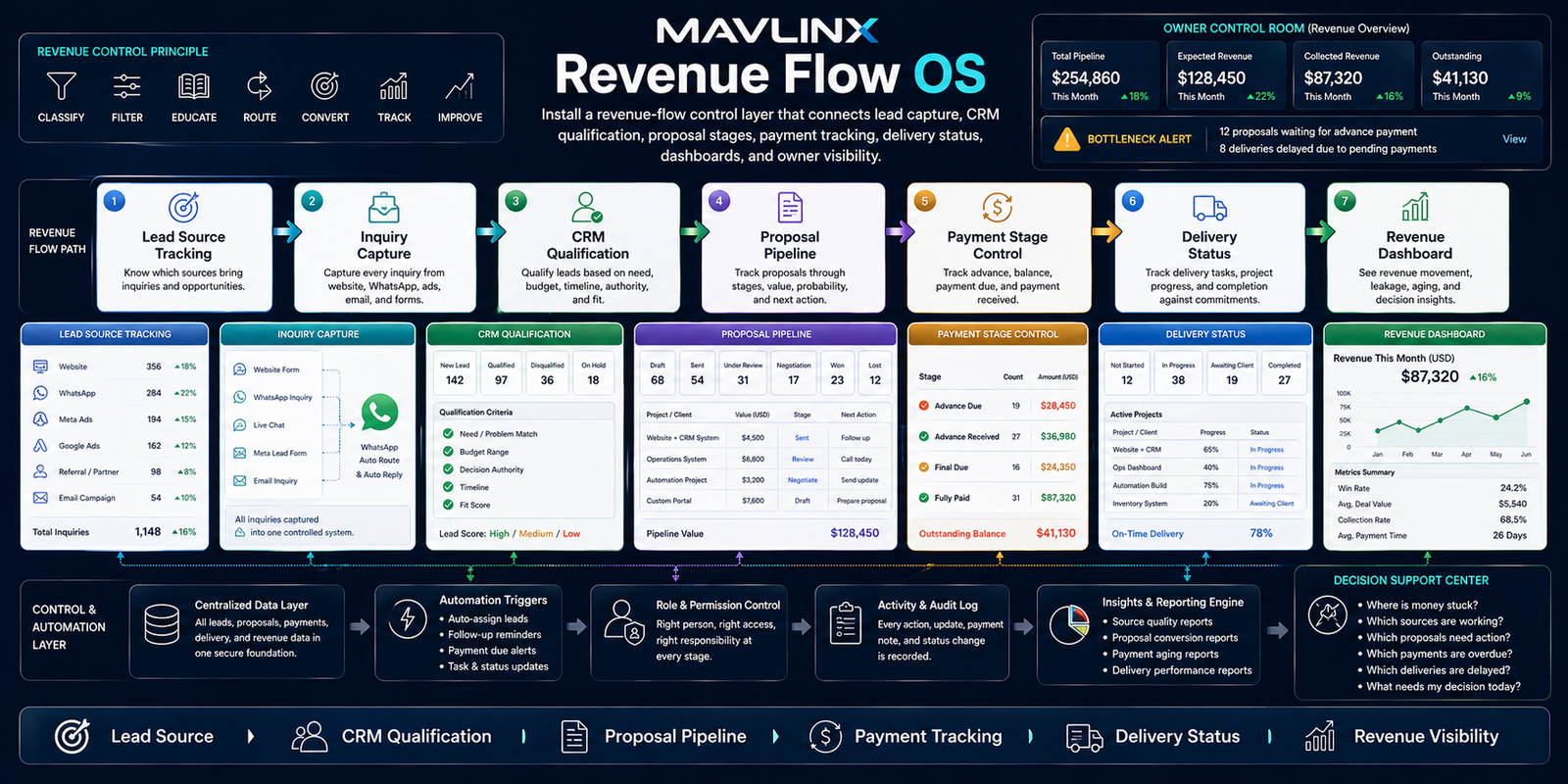
MAVLINX Revenue Flow OS — lead source tracking, inquiry capture, CRM qualification, proposal pipeline, payment tracking, delivery status, and revenue visibility.
A business does not lose money only because it has fewer leads. It loses money when qualified inquiries do not become proposals, proposals are not followed up, advances are not tracked, delivery status is unclear, and final payment is not visible.
Revenue leaks when lead, proposal, payment, and delivery are disconnected.
Many SMEs treat revenue as a final number. MAVLINX treats revenue as movement through stages. A lead enters from a source, becomes an inquiry, gets qualified, receives a proposal, pays advance, enters delivery, becomes final-due, and closes only when the final payment and handover status are visible.
If those stages live in different places, the owner sees activity but not revenue flow.
The non-obvious failure is stage blindness.
Owners often ask for more marketing when the immediate leakage is inside the revenue path. The business may already have enough inquiries, but it cannot clearly see proposal aging, advance collection, delivery bottlenecks, and final-payment exposure.
Revenue Flow OS exposes movement from lead source to closed revenue so the owner can review where money is stuck, which stage needs action, and which operational handoff is creating delay.
MAVLINX Revenue Flow OS connects the commercial path from lead source to revenue dashboard. It does not replace accounting, but it gives the owner an operational view of revenue movement before, during, and after payment.
Revenue Flow OS can be installed as an extension of CRM, funnel, delivery, or dashboard systems. The exact module depth depends on your lead sources, proposal process, payment model, and delivery workflow.
Lead Source Tracking
Tag revenue movement by source so website, SEO, ads, referrals, partners, and manual leads can be reviewed beyond first inquiry.
CRM Qualification
Connect each inquiry to fit, urgency, budget, status, owner, next action, and qualification outcome.
Proposal Pipeline
Track proposal sent, revision, accepted, rejected, follow-up due, aging, and decision status.
Payment Stage Control
Record advance due, advance received, final due, final received, balance pending, and closure state.
Delivery Status
Connect project or service delivery movement to payment visibility, blockers, handover state, and owner review.
Revenue Dashboard
Show revenue-stage counts, stuck proposals, pending payments, source quality, delivery bottlenecks, and final closure.
Choose the route according to where your revenue is leaking: before lead capture, inside CRM, during proposal, around payment, or after delivery starts.
I do not know where money leaks.
Use recommendation when your business needs diagnosis before selecting CRM, funnel, dashboard, or custom workflow setup.
- Leakage diagnosis
- System route
- Stage visibility
Leads and follow-up are weak.
Use CRM setup when inquiry capture, qualification, staff assignment, or follow-up discipline is the main leakage.
- CRM fields
- Status tracking
- Follow-up control
Paid traffic is leaking.
Use funnel route when ads, landing pages, lead forms, and CRM handoff need to connect to revenue stages.
- Landing route
- Lead capture
- CRM handoff
Delivery and payment are tangled.
Use install request when revenue flow needs deeper dashboard, delivery, payment, or operational workflow setup.
- Payment stages
- Delivery status
- Revenue dashboard
MAVLINX installs revenue-flow control by mapping the commercial movement first, then connecting capture, qualification, proposal, payment, delivery, and reporting.
Map lead and revenue sources
We identify where inquiries come from, which sources create proposal movement, and where source tags should be captured.
Define qualification and proposal stages
The business path is mapped from inquiry to qualification, proposal, revision, approval, rejection, or follow-up.
Define payment and delivery states
Advance due, advance received, in progress, final due, final received, handover, and closed states are clarified.
Install tracking and dashboard surfaces
Fields, statuses, owner markers, payment states, delivery status, and dashboard surfaces are installed where relevant.
Review and improve revenue movement
Once the path is visible, MAVLINX can help identify stage leakage, delayed proposals, stuck payments, and delivery bottlenecks.
Is Revenue Flow OS an accounting system?+
Does MAVLINX guarantee revenue or cash flow?+
Can this connect with CRM and payment stages?
What payment stages should be tracked?
Can this work for service businesses?
What should I prepare before requesting this system?
Stop losing money between inquiry, proposal, payment, and delivery.
Leads are only the beginning. Revenue control starts when every serious inquiry can be tracked through qualification, proposal, payment, delivery, and closure. Install a Revenue Flow OS so movement becomes visible.