Engineering Company System
Engineering Company System is a MAVLINX vertical operating system for engineering companies, technical consultancies, project offices, and field teams that need control over project intake, technical scope, engineering tasks, drawing reviews, revision tracking, approvals, QA/QC notes, field updates, milestones, reports, and owner dashboards.
This is not a generic CRM, CAD tool, or decorative project board. MAVLINX installs the workflow-control layer that helps an engineering owner see what came in, what is under review, what revision is open, who must approve, which issue is pending, and where the project stands.
Engineering firms rarely lose control because the team lacks technical knowledge. They lose control because scope, drawings, revisions, comments, reviews, field issues, QA/QC notes, approvals, procurement requests, milestones, and reports are scattered across files, emails, WhatsApp, calls, spreadsheets, and memory.
Engineering leakage is usually technical traceability failure.
A project inquiry arrives. A drawing is revised. A client comment comes back. A field issue is raised. A QA/QC flag is pending. A manager approval is delayed. If there is no operating layer, technical work continues but management cannot see the full truth.
The non-obvious failure
Many engineering companies think the answer is another software tool, more meetings, or more manual reporting. Often, the real gap is that technical decisions are not connected to a visible operating trail.
MAVLINX installs the control layer before the business scales more projects, teams, vendors, reviews, or reporting obligations.
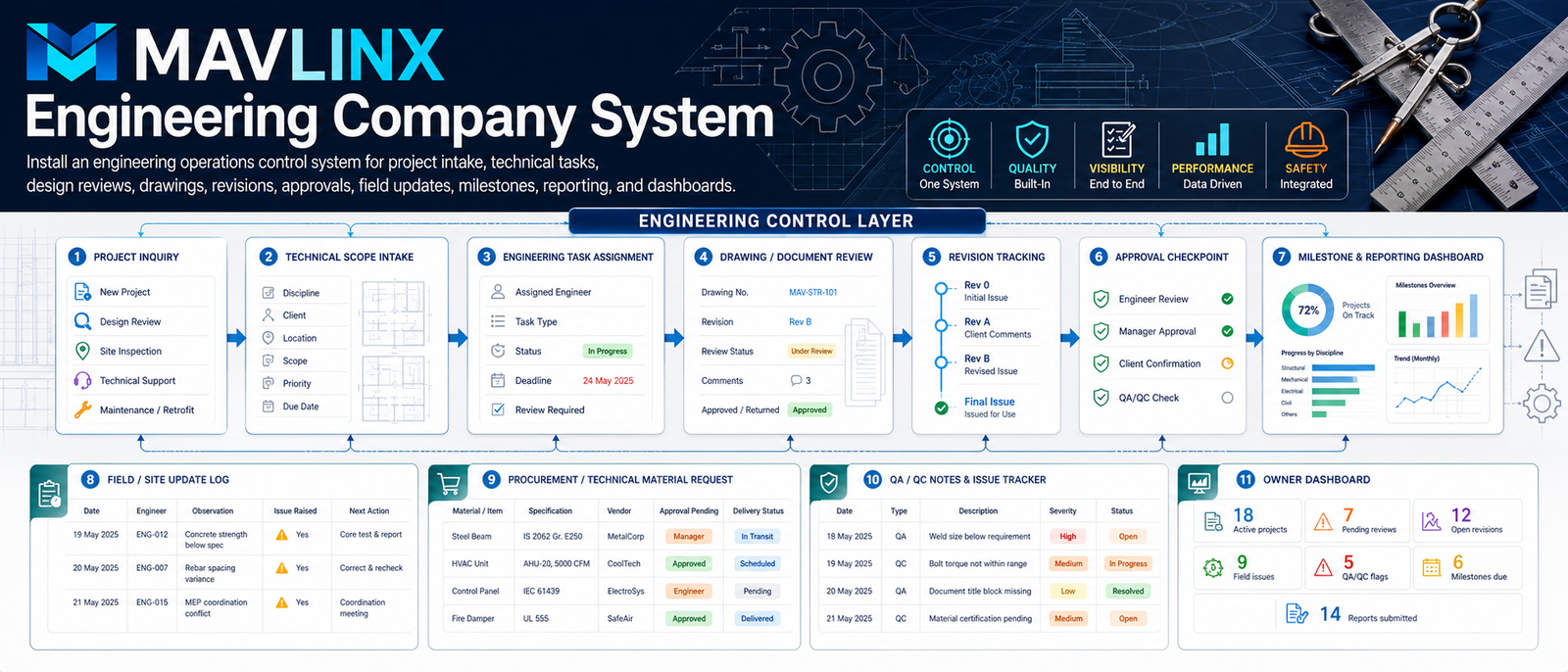
MAVLINX installs an engineering operations control system around your actual workflow: project intake, technical scope, engineering task assignment, drawing and document review, revision tracking, field updates, QA/QC notes, procurement requests, approval checkpoints, milestones, reports, and owner dashboards.
Project & Technical Scope Intake
Capture new project, design review, site inspection, maintenance, retrofit, or technical support requests with discipline, client, location, scope, priority, and due date.
Engineering Task Assignment
Assign engineers, task type, review requirement, deadline, status, responsibility, and next action for technical execution.
Drawing & Document Review
Track drawing numbers, document type, revision, review comments, returned status, approval notes, and final issue movement.
Revision Tracking
Follow Rev 0, Rev A, Rev B, client comments, internal review, final issue, and closeout visibility in one revision trail.
Field Update & QA/QC Logs
Record field observations, engineer notes, issues raised, QA/QC flags, blockers, next actions, escalation, and report status.
Owner Dashboard
Show active projects, pending reviews, open revisions, field issues, QA/QC flags, milestones due, submitted reports, and delayed approvals.
The system is built to connect technical activity to practical project-control visibility.
New project, design review, site inspection, retrofit, or technical support inquiry enters intake.
Discipline, client, location, scope, priority, due date, and project notes are captured.
Engineer, task type, deadline, review requirement, and responsibility are assigned.
Drawing number, revision, comments, review status, and approval movement are tracked.
Open revisions, client comments, returned drawings, and final issue status are controlled.
Engineer review, manager approval, client confirmation, and QA/QC checks are routed.
Owner sees project stage, pending reviews, open issues, QA/QC flags, reports, and milestones.
Engineering systems are custom vertical operational systems because every technical consultancy, engineering firm, field team, and project office has different scope intake, review, revision, QA/QC, document, approval, and reporting requirements.
Engineering Operations Control System
Best for engineering businesses that need structured project intake, technical scope control, task assignment, drawing review, revision tracking, field reporting, approval checkpoints, QA/QC notes, milestone tracking, and owner dashboards.
Typical included system components
- Project inquiry and technical scope intake fields
- Discipline, client, location, priority, due date, and source tracking
- Engineering task assignment, status, review requirement, and responsibility logic
- Drawing/document review fields for drawing number, revision, comments, approval, and returned status
- Revision tracking for Rev 0, Rev A, Rev B, client comments, final issue, and closeout
- Field update logs for engineer observations, site issues, blockers, next actions, and escalations
- QA/QC notes, technical flags, manager approval, client confirmation, and report status
- Owner dashboard surfaces for active projects, pending reviews, open revisions, QA/QC flags, field issues, reports submitted, and milestones due
Domain, hosting, paid tools, premium APIs, WhatsApp API, SMS, third-party subscriptions, CAD/BIM software, external project-management software, accounting tools, ad spend, payment gateway charges, engineering certifications, and legal/technical verification services are excluded unless included in a signed proposal.
Use the route that matches your current buyer state. This page is for vertical system fit, not casual contact.
I run an engineering company and need a similar system.
Use this when you want MAVLINX to understand your technical workflow and propose a practical installed control system.
- Technical scope flow
- Drawing/revision logic
- Dashboard requirement
I want to understand custom system logic first.
Use this route if you need to understand MAVLINX custom vertical systems before submitting a project request.
- Vertical workflow logic
- Custom implementation path
- Operational architecture
I am unsure whether I need CRM, dashboard, or full system.
Use this when the problem is visible but the correct system path is not yet clear.
- Diagnosis first
- Correct routing
- Package-fit clarity
These answers prevent confusion between an engineering operating system, generic project-management software, CAD/BIM tools, and a standard CRM.
Is this an engineering company website?+
Is this CAD, BIM, or design software?+
Can it track drawing revisions and comments?+
Can it support field engineer updates?+
Does MAVLINX guarantee project approvals or engineering outcomes?+
Stop managing engineering work from scattered files, chats, and memory.
Install an engineering operations control system that connects project intake, technical scope, task assignment, drawing review, revision tracking, approvals, QA/QC notes, field updates, reports, milestones, and owner dashboard visibility.