Contact MAVLINX Support Routing
Contact MAVLINX Support Routing is the controlled contact layer for visitors who need the right MAVLINX path. Use this page to choose between recommendation, installation request, CRM setup, funnel build, business idea submission, similar system request, pricing comparison, or support-only contact.
MAVLINX does not use Contact as the main conversion shortcut. Serious buyers are routed into the correct system path so their request can be classified, tracked, reviewed, and followed up without creating vague inbox noise.
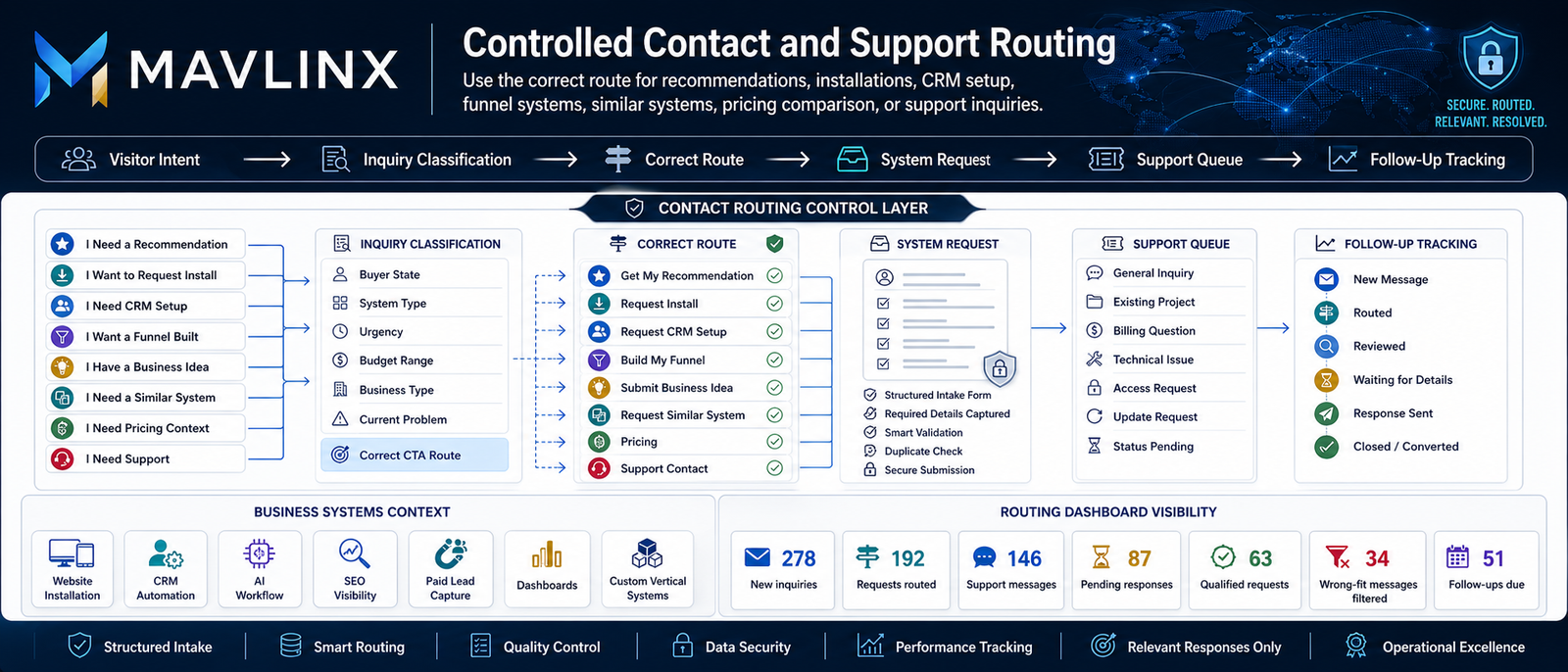
A generic contact page sends every visitor into the same inbox. That creates unclear requests, missing context, wrong-fit messages, weak follow-up, and slow decision-making. MAVLINX treats contact as a routing layer, not a dumping ground.
Generic contact creates routing leakage.
A buyer asks for a website but actually needs lead capture. Another asks for automation but lacks CRM stages. A third wants AI but has no SOPs. A support message is mixed with a new installation request. Without classification, the contact page becomes operational noise.
Vague messages
“I need help” gives no buyer state, system type, urgency, or operational context.
Wrong route
Install, CRM, funnel, support, and pricing requests should not enter the same path.
No tracking
Open messages are hard to classify, assign, follow up, or convert into a clear next step.
The MAVLINX correction
Contact is reserved for controlled support and non-commercial inquiries. Business buyers should use the correct route so their request enters the right classification and workflow path.
Use these routes before submitting a general message. They help MAVLINX classify the request correctly and reduce follow-up waste.
I am unsure what system I need.
Use this when the business problem is visible but the correct website, CRM, AI, SEO, funnel, or custom system path is unclear.
I know I need an installation.
Use this when you are ready to request website, system, automation, dashboard, or infrastructure installation.
I need CRM or control setup.
Use this when leads, follow-ups, staff assignment, status stages, summaries, or dashboards are the main gap.
I want a lead funnel built.
Use this when the need is landing page, form, ad-ready route, lead capture, source tracking, and campaign handoff.
I have a business idea.
Use this when you need MAVLINX to classify a new business idea and decide whether a system path makes sense.
I need a similar vertical system.
Use this when you saw a vertical page and need a similar operational workflow system for your business.
I am comparing cost and scope.
Use this when you need package context before sending a request. Pricing is for comparison-stage buyers.
I have support or status question.
Use the support form below only for existing project questions, billing/status queries, access issues, or general support messages.
Use this form only when your message does not belong in a recommendation, installation, CRM setup, funnel, business idea, similar system, or pricing route.
Before you submit
This form is for controlled support and general routing. It is not the fastest route for new buyers who already know what they need. Use the correct request path where possible.
Contact messages are useful only when they enter a trackable support or routing process. This is the intended operating flow.
The visitor decides whether the need is diagnosis, installation, CRM, funnel, idea, similar system, pricing, or support.
The route captures buyer state, system type, urgency, business type, and current problem.
The inquiry enters the correct MAVLINX funnel, request path, support queue, or comparison route.
MAVLINX reviews the context and separates qualified requests from unclear or wrong-fit messages.
The message is marked as routed, reviewed, waiting for details, response sent, closed, or converted.
The request becomes visible for support handling, qualification, reporting, and future improvement.
These answers prevent the Contact page from becoming a generic consultation or inbox shortcut.
Why does MAVLINX use routing instead of a simple contact page?+
Which route should I use if I do not know what I need?+
Can I use this form for a new project?+
Does submitting a message guarantee acceptance or instant response?+
What should existing clients use this page for?+
Do not send a vague message if a better route exists.
MAVLINX works best when your intent is classified first. Start with recommendation if you are unsure, request install if you are ready, or use support only for messages that do not belong in a commercial request route.