Custom Business Systems
Custom business systems are for businesses whose operations cannot be solved by a fixed website, CRM, SEO, AI, ads, or package route. If your workflow needs custom intake, routing, roles, approvals, dashboards, automation, reporting, or decision visibility, the system must be mapped before it is built.
MAVLINX installs practical custom business-control systems for SMEs. These are not generic software projects, template apps, or vague automation promises. Each system starts from the real workflow and turns it into structured intake, ownership, status movement, approval paths, reporting, and control.
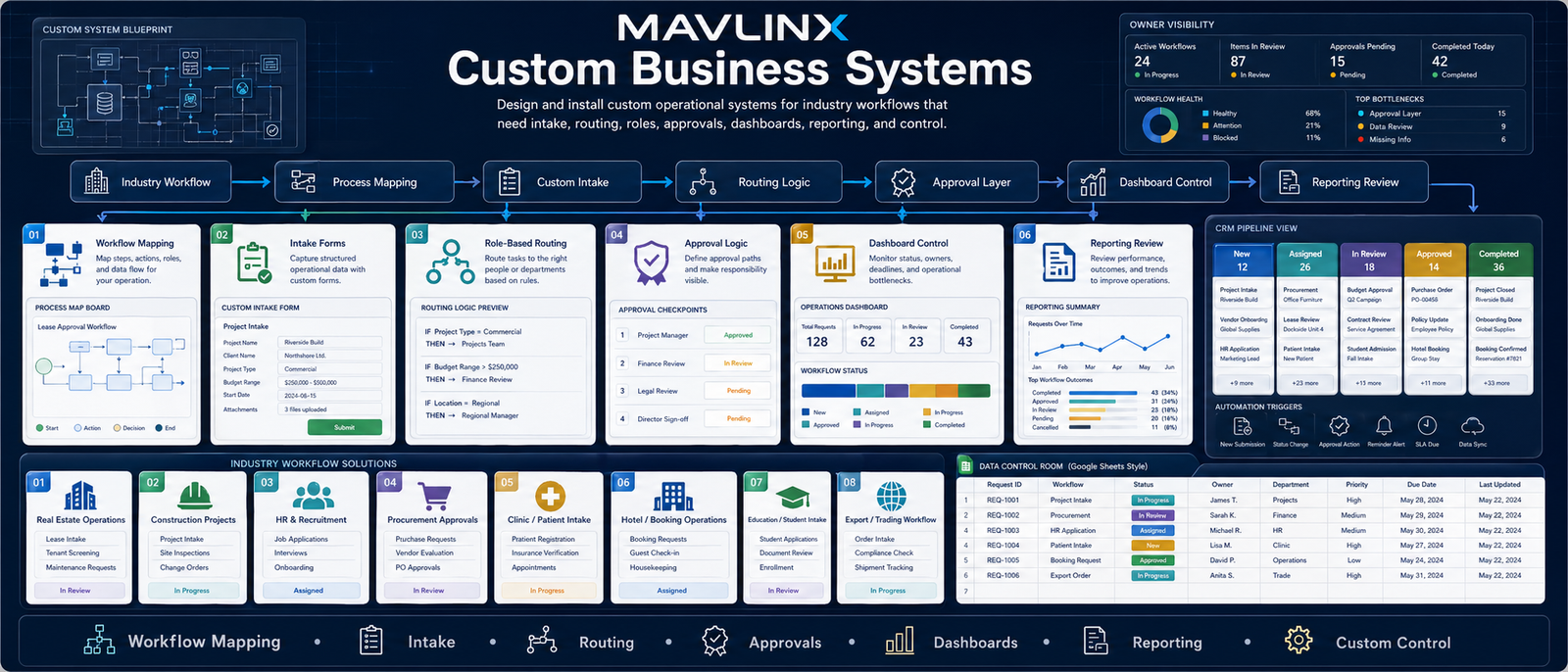
MAVLINX Custom Business Systems — workflow mapping, intake, routing, approvals, dashboards, reporting, automation, and decision control.
Custom system failure usually starts before development. The business asks for an app, software, dashboard, or automation — but the workflow, roles, intake, approval rules, ownership, and reporting logic are not mapped first.
Fixed packages fail when the workflow is unique.
Some businesses cannot be solved by a normal website, lead form, CRM sheet, or marketing funnel. Real estate teams, construction firms, recruitment teams, procurement departments, clinics, hotels, schools, trading businesses, and field teams often need custom operating logic.
The danger is buying software before defining the operational path. That creates another tool, but not a control system.
The non-obvious task is workflow control before technology.
A custom business system is not successful because it is complex. It is successful when the business can see what entered the system, who owns it, what stage it is in, what is blocked, who must approve it, and what decision should happen next.
MAVLINX builds custom systems as operational control layers, usually using practical business infrastructure such as forms, Sheets, Apps Script, dashboards, structured workflows, and client-owned data surfaces where suitable.
MAVLINX custom systems follow an operational sequence: industry workflow, process mapping, intake, routing, approvals, dashboard control, and reporting review.
Workflow Mapping
Document the actual business process before designing forms, automations, dashboards, or user roles.
Intake Forms
Capture structured operational data through forms, sheets, page forms, or controlled intake routes.
Role-Based Routing
Send work to the right person, department, branch, or status based on workflow rules.
Approval Logic
Make review, approval, rejection, escalation, and closure visible instead of informal.
Dashboard Control
Show owner-level visibility across status, workload, bottlenecks, response time, and completion.
Reporting Review
Convert daily operations into weekly or monthly review surfaces for management decisions.
These are starting points for common custom operational systems. Final scope depends on workflow depth, number of roles, approval complexity, dashboards, integrations, and reporting requirements.
Real Estate Lead & Property Control System
For property leads, buyer/seller records, follow-ups, inventory, routing, and deal-stage visibility.
- Lead and property intake
- Agent assignment
- Follow-up tracking
- Pipeline dashboard
Construction Project Control System
For project stages, site updates, procurement movement, tasks, approvals, and reporting.
- Project intake
- Task/status tracking
- Approval logs
- Progress dashboard
HR & Recruitment Workflow System
For applicant intake, screening, interview stages, hiring decisions, and recruitment reporting.
- Candidate intake
- Screening stages
- Interview routing
- Hiring dashboard
Procurement Tracking & Approval System
For purchase requests, vendor comparison, approval chains, status tracking, and reporting.
- Request intake
- Vendor tracking
- Approval stages
- Procurement dashboard
Patient Inquiry & Operations Control System
For clinic inquiries, patient routing, appointment request flow, staff assignment, and owner visibility.
- Patient inquiry intake
- Department routing
- Status tracking
- Operations dashboard
Hotel / Booking Operations Control System
For booking inquiries, guest requests, staff tasks, service status, and reporting control.
- Booking inquiry intake
- Guest request routing
- Task assignment
- Service dashboard
Education & Student Intake System
For student inquiries, admissions stages, counselor routing, course interest, and follow-up visibility.
- Student intake
- Program interest
- Counselor assignment
- Admission dashboard
Export & Trading Workflow System
For inquiries, quotations, shipment status, buyer communication, documentation, and tracking.
- Inquiry intake
- Quotation workflow
- Shipment tracking
- Trading dashboard
Choose the next route by how clearly you understand your workflow and whether your requirement resembles an existing vertical system.
I have a new business idea.
Use this route when the workflow, system concept, or business model needs validation and mapping.
- Idea intake
- Workflow concept
- System-fit review
I need a similar system.
Use this route when your workflow resembles one of the vertical systems or examples on this page.
- Industry workflow
- Similar system route
- Scope mapping
I mainly need CRM control.
Use CRM setup when your problem is lead tracking, assignment, follow-up, and owner visibility.
- Lead tracking
- Status logic
- Owner dashboard
I know what to install.
Use request install when the system family, package route, or scope is already clear enough.
- Known scope
- Install request
- Project intake
MAVLINX does not start custom systems from screens. It starts from the operating path that must be controlled.
Capture the workflow problem
We identify what is currently scattered: intake, records, staff assignment, approvals, communication, reporting, or owner visibility.
Map users, stages, and decisions
The workflow is mapped by role, stage, action, approval, exception, escalation, and reporting requirement.
Define system surfaces
We decide what needs forms, sheets, dashboards, automations, notifications, approval logs, or client-facing routes.
Install the control layer
The system is built around structured data, routing logic, ownership markers, status visibility, dashboards, and review surfaces.
Review and improve after use
Once the workflow is active, the system can be refined around real bottlenecks, missing fields, staff behavior, and reporting needs.
Are custom business systems the same as custom software?+
Why do custom systems start with mapping?+
Can MAVLINX build for my industry if it is not listed here?+
Are third-party tools and integrations included?+
Does MAVLINX guarantee automation, revenue, or business results?+
What should I submit first?+
Submit the workflow before asking for software.
The right custom business system starts with the operating reality: intake, routing, roles, approvals, dashboards, reporting, and owner visibility. MAVLINX maps the workflow first, then installs the control layer.