Business Systems
Business systems are the connected control layers that help an SME capture demand, route inquiries, assign ownership, track follow-up, support workflows, classify visibility, review performance, and improve decisions.
MAVLINX is a Global Business Systems Installation Provider. We do not treat websites, CRM, AI, SEO, ads, dashboards, and custom workflows as isolated services. We install them as connected business-control infrastructure.
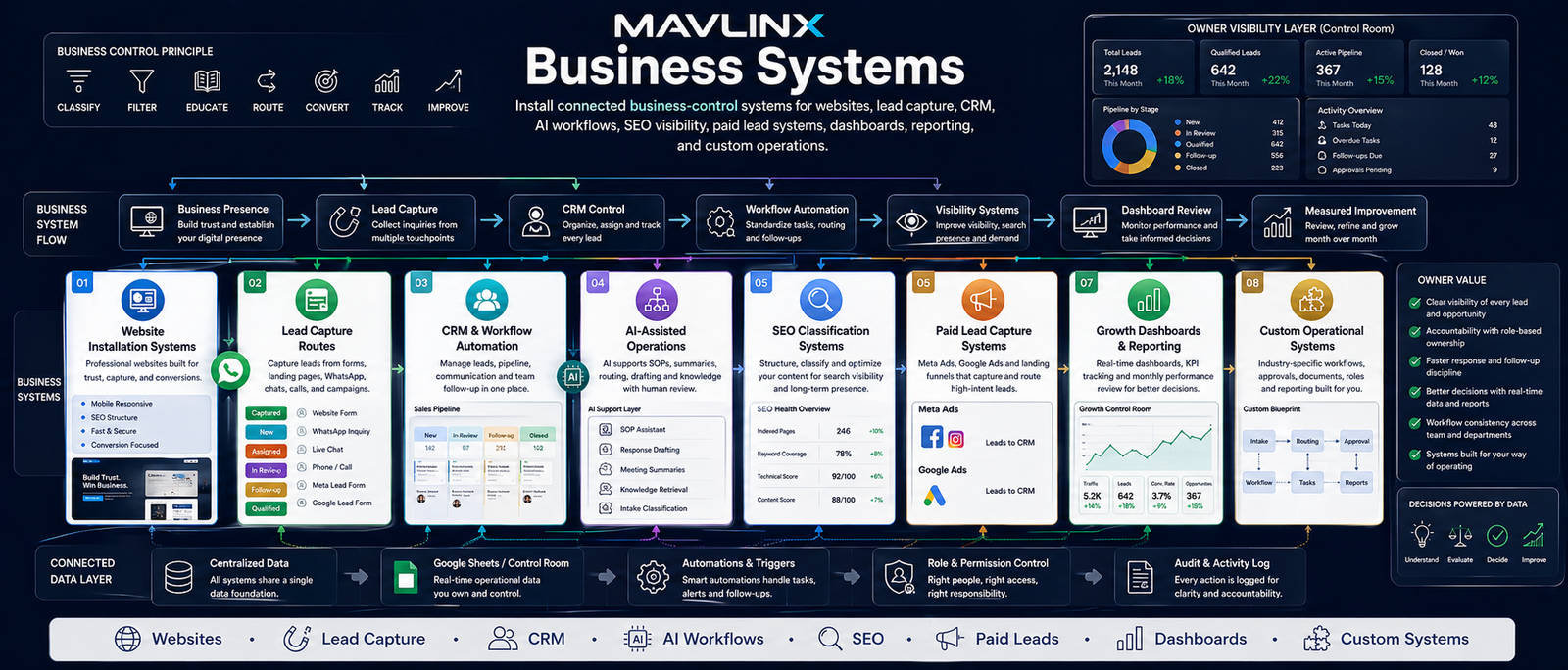
MAVLINX Business Systems — websites, lead capture, CRM, automation, AI-assisted workflows, SEO visibility, paid lead capture, dashboards, reporting, and custom operations.
Most SMEs do not fail because they lack tools. They fail because their tools do not operate as one system. A website exists, leads come through WhatsApp, staff follow up manually, SEO is separate, ads are separate, and the owner cannot see what is actually moving.
Disconnected digital assets do not create control.
A website without capture logic is just presence. Ads without CRM handoff create noise. SEO without routing creates weak commercial visibility. AI without SOPs creates risk. Dashboards without clean source data become decoration.
A business system connects the path from first attention to visible action.
The non-obvious asset is the operating path.
MAVLINX does not sell random web pages, CRM tables, AI prompts, SEO titles, or ad dashboards as disconnected outputs. The real asset is the installed operating path: capture, route, track, review, and improve.
That path is what makes a business owner less dependent on memory, screenshots, scattered WhatsApp messages, manual reminders, and staff verbal updates.
MAVLINX business systems follow a practical control sequence: business presence, lead capture, CRM control, workflow automation, visibility systems, dashboard review, and measured improvement.
Each MAVLINX system family solves a different control problem. The correct route depends on business stage, lead flow, staff visibility, workflow depth, search visibility, paid demand, and reporting needs.
Website Installation Systems
For businesses that need credible presence, page structure, inquiry capture, SEO foundations, and CRM-ready routing.
- Website pages
- Lead routes
- WhatsApp/form capture
- Business-facing structure
Business Control & CRM Automation
For owners who need lead tracking, staff assignment, follow-up control, summaries, and dashboard visibility.
- Lead status logic
- Staff ownership
- Follow-up discipline
- Owner reporting
AI Workflow Systems
For teams needing AI-assisted SOP support, summaries, routing support, knowledge control, and human-reviewed workflows.
- AI workflow audit
- Response support
- Knowledge control
- Approval loops
SEO Classification & Visibility
For websites that need metadata, schema, internal links, indexing readiness, search intent, and conversion routes.
- Page classification
- Search structure
- Internal linking
- Indexing checks
Paid Lead Capture Systems
For Meta Ads and Google Ads that need landing routes, lead forms, tracking fields, CRM handoff, and follow-up review.
- Campaign route
- Landing page logic
- Lead capture
- CRM handoff
Digital Growth Control Room
For monthly review of SEO, ads, CRM tracking, funnel leakage, dashboards, reporting, and growth decisions.
- SEO/ads coordination
- Lead tracking review
- Dashboard reporting
- Monthly cadence
Business Launch Bundles
For businesses that need multiple layers installed together: website, lead capture, SEO, CRM, dashboards, and routing.
- Website + capture
- CRM handoff
- SEO base
- Dashboard-ready setup
Custom Business Systems
For vertical workflows that need intake, routing, roles, approvals, dashboards, reporting, and operational control.
- Workflow mapping
- Role-based routing
- Approval logic
- Reporting surfaces
Use this route when you know the operational pain but are not sure which MAVLINX system should come first.
I am unsure what I need.
Start with diagnosis if your business pain is clear but the system route is not.
- Leakage classification
- System-family fit
- Recommended route
I am comparing packages.
Use pricing when you need budget ranges across website, CRM, AI, SEO, ads, and bundles.
- USD package ladder
- Scope comparison
- Buyer readiness filter
I know what to install.
Use install request when you already understand the required system or package path.
- Known scope
- Project intake
- Installation request
My workflow is custom.
Use custom routes when your operation needs mapping before fixed package selection.
- Workflow mapping
- Vertical use case
- Custom control layer
MAVLINX pages, products, and funnels follow one commercial operating rule: do not build disconnected digital assets when the business needs a control system.
Every page must route.
A MAVLINX page must classify a buyer, explain the system, route the next action, and support measurable business control. Brochure pages fail.
Every system must expose leakage.
The system must identify what is leaking: leads, ownership, visibility, response time, search classification, paid spend, or workflow decisions.
Every route must reduce confusion.
Unsure buyers go to recommendation. Ready buyers request install. CRM buyers request setup. Paid lead buyers build a funnel. Custom buyers submit the workflow.
AI stays human-reviewed.
AI is positioned as assistance for SOPs, summaries, routing, knowledge control, and decision support — not staff replacement or fully autonomous business operation.
Visibility must support decisions.
Dashboards and reports are useful only when they help the owner decide what to improve, pause, repair, route, assign, or review.
Growth follows control.
SEO, ads, and campaign activity work better after the lead path, CRM handoff, response discipline, and reporting surfaces are clear.
MAVLINX installation starts by identifying the business-control gap, then selecting the right system layer and route.
Classify the current leakage
We identify whether the main issue is presence, capture, CRM, staff action, workflow routing, visibility, paid demand, reporting, or custom operations.
Select the correct system family
The buyer is routed toward website, CRM, AI, SEO, paid lead, growth control, bundle, or custom system path.
Install capture and routing logic
Pages, forms, CRM fields, statuses, ownership markers, workflows, and handoff routes are installed where required.
Expose owner visibility
Dashboards, summaries, and review surfaces show what is happening across leads, sources, stages, response, tasks, and bottlenecks.
Improve after tracking exists
Once the system can show what is happening, SEO, ads, automation, content, and operations can be improved with less guesswork.
Is MAVLINX a web design agency?+
What is a business system in practical terms?+
Which system should I start with?+
Does MAVLINX guarantee leads, rankings, sales, or revenue?+
Does AI replace staff in MAVLINX systems?+
What route should I use if I have a custom workflow?
Start with the system route, not another disconnected asset.
A website, CRM, AI workflow, SEO setup, ad funnel, dashboard, or custom workflow only becomes useful when it belongs to a business-control architecture. Start by identifying the right MAVLINX system route.